← apps.thomas-gossler.de  ·  Practical software for real problems. English (US)
Cross-tenant work-item & portfolio intelligence for Azure DevOps + GitHub
Coming soon

The only solution to unify all your Azure DevOps and GitHub data, across any tenant, with optional AI insights from the provider you choose — in minutes.

Portfolio intelligence across every org, tenant, and project — governed, and fully local if you need it.

30-day free evaluation.NET 10 LTSLinux · Windows · macOS

Real product output. Nothing here is a mock-up.

The problem

Your work items are scattered. Your insight shouldn't be.

Work that belongs together rarely lives together. Four forces split it across Azure DevOps organizations, Entra ID tenants, and GitHub:

M&A

Acquired teams bring their own orgs and tenants.

Scale limits

Azure DevOps org/project ceilings split growing estates.

Compliance separation

Regulated units get their own tenant on purpose.

History

“It was set up that way in 2016.”

The portfolio exists. Nobody can see it in one place.

Before
  • Per-org exports, spreadsheet merges, stale by Friday
  • Power BI cross-org build: weeks, separate datasets, no cross-org links
  • Single-tenant MCP server: stops at the boundary
Three per-organization exports feeding a spreadsheet and a BI dashboard through tangled lines; an MCP plug blocked by a tenant boundary Org A exportOrg B exportOrg C exportother tenant spreadsheet · stale by FridayBI build · weeks · per-org data single-tenant MCPtenant boundary N exports · M merges · 0 cross-org relationships

Microsoft documents the manual Power BI cross-organization path — it works, and it takes weeks. Read the devblog ↗

After — with azdw
  • One query across every org and tenant
  • Live, re-runnable, any format
  • Relationships resolved across the boundary
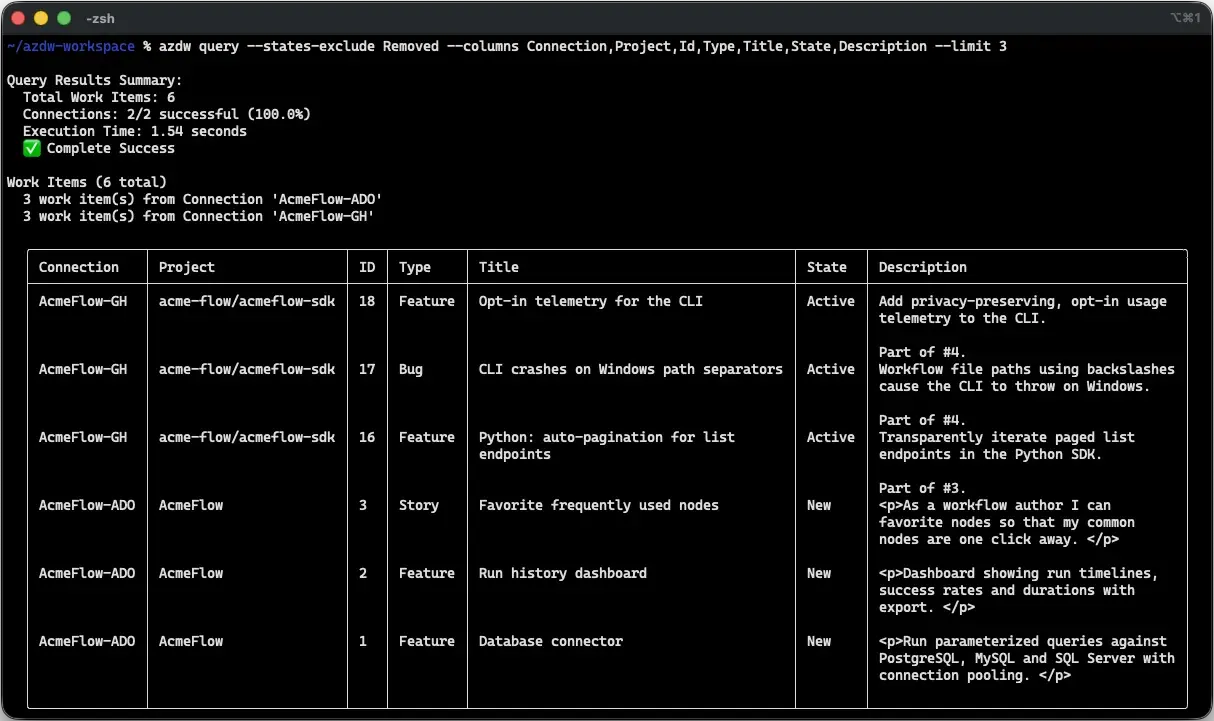
azdw query output: one integrated table with Connection and Project columns spanning an Azure DevOps organization and a GitHub repository

azdw query --columns Connection,Project,Id,Type,Title,State — two providers, one table.

How it works

Connect. Resolve. Insight.

Three steps, no BI project, no data warehouse. Every step is a command you can commit and re-run.

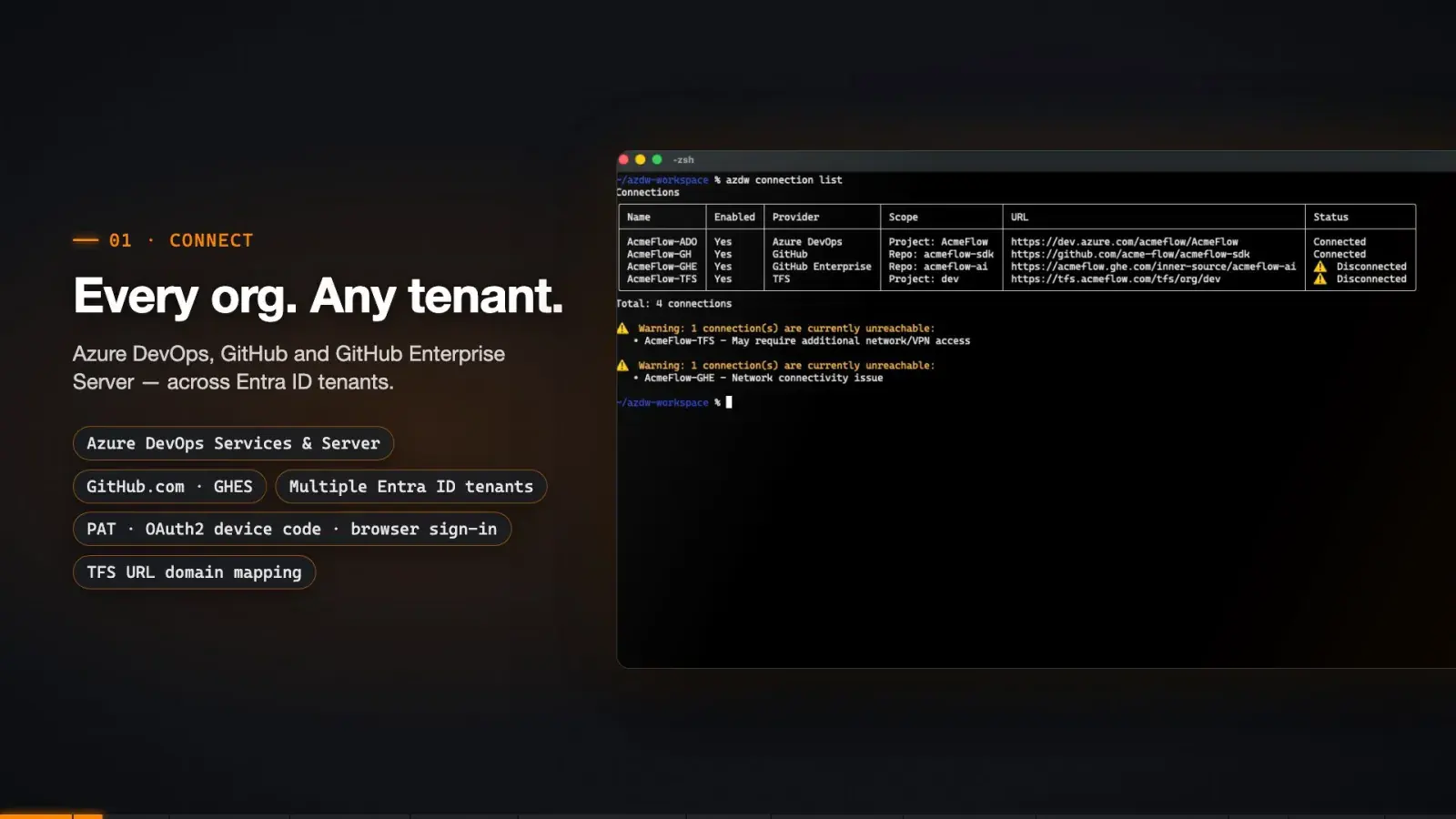
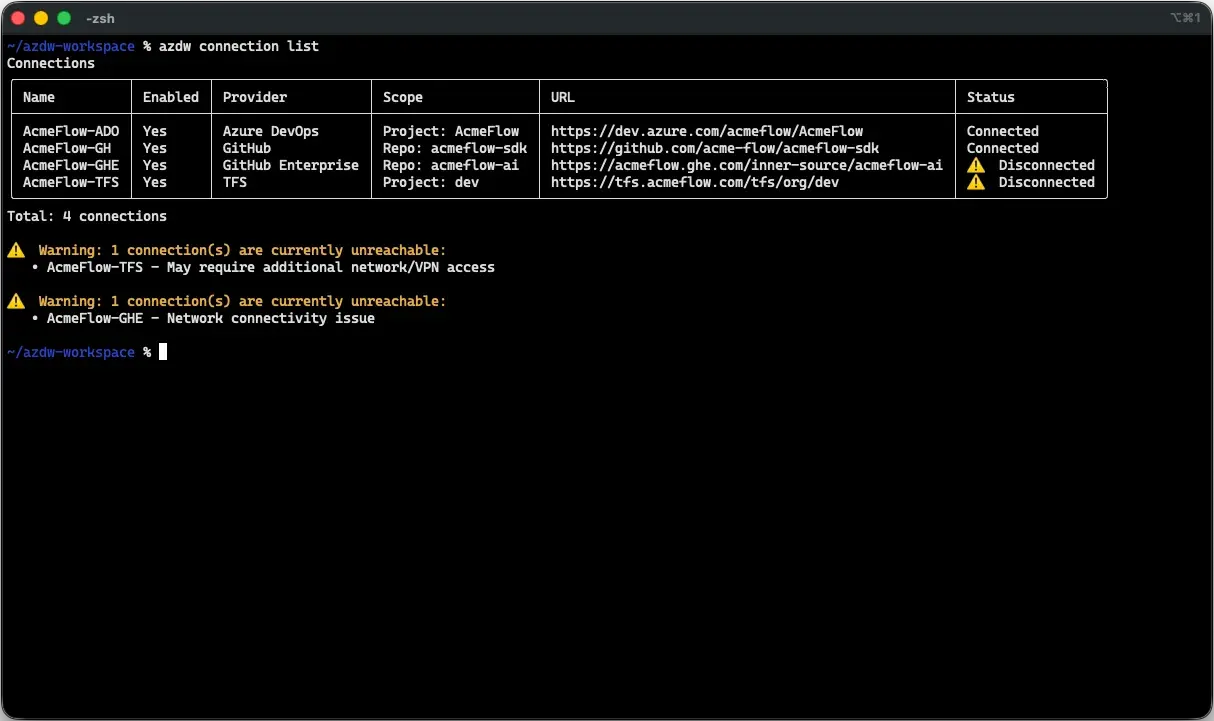
azdw connection list showing Azure DevOps, GitHub, GitHub Enterprise Server and TFS connections
Connect

Every org, any tenant

Azure DevOps Services and Server, GitHub.com and GitHub Enterprise Server — across Entra ID tenants. PAT, OAuth2 device code, or browser sign-in.

azdw connection add --name CT --url https://dev.azure.com/…
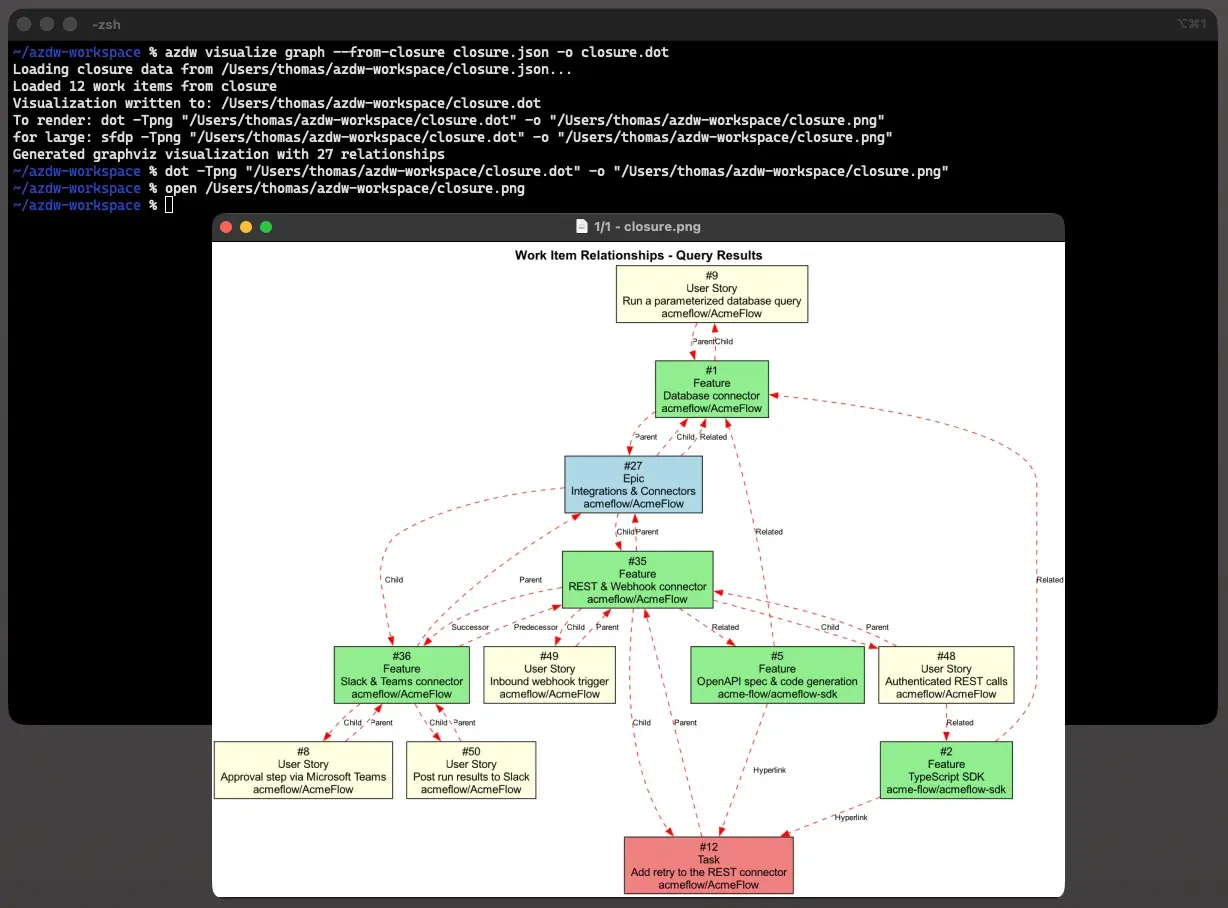
GraphViz relationship graph of a work-item closure resolved across connections
Resolve

Relationships into one graph

Hierarchy, dependencies, and hyperlinks — including links pointing back in from another org — resolved into a queryable closure.

azdw relationship find-closure --ids 9 --top-type Epic
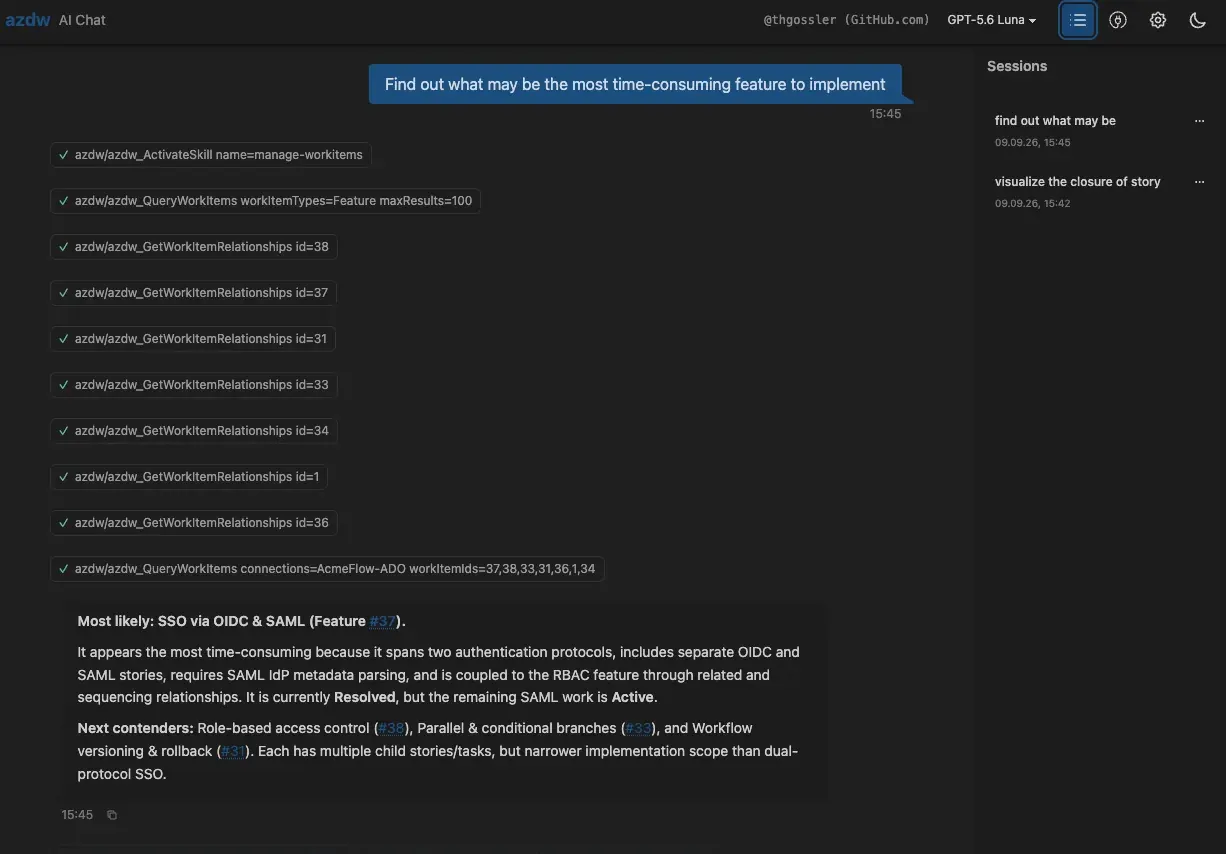
azdw Web UI chat answering a portfolio question in plain language
Insight

With or without AI — local or cloud

Tables, reports, and graphs without a model; plain-language answers with one. Zero-setup Web UI for leaders, CLI and MCP for engineers and agents.

azdw ai-chat --webui
Use it your way

From no AI at all to AI calling the tool.

The deterministic data layer works without AI. If you opt in, you choose the provider and model and can change them later without changing your collection and query scripts.

1

CLI without AI

No model anywhere. Query, resolve, report, visualize — interactively or headless, with guaranteed --json and exit codes. Drop it into a pipeline and run it on a schedule.

azdw query --connections A,B,C --json \
  | jq '.[] | select(.State=="Active")'
2

CLI with configured AI

Add value where it counts: plain language to WIQL with --ai, closure narratives with --ai-tell-story, AI-assessed reconciliation, terminal chat and the Web UI.

azdw query --ai "high-risk items not \
  assigned to a release"
3

Also with local AI only

Keep model processing local: run the model on your own hardware with Ollama or another local OpenAI-compatible endpoint. Work-item content stays in your infrastructure when every model and agent endpoint in the workflow is local.

azdw config ai set --approach ollama \
  --model gemma4:12b
4

Or with your GitHub Copilot subscription

Already paying for Copilot? Use it as azdw's AI provider — no extra API key, no new vendor. Anthropic, OpenAI and Azure endpoints work too.

azdw config ai set \
  --approach github-copilot
5

As MCP server for your AI agent

Let the agent do the tool calling. VS Code Copilot, Claude Code or Claude Desktop get a pre-shaped, deterministic view of your work items — with two-phase approvals on every write.

azdw mcp
azdw config ai skills install

AI is optional. Its output comes from the provider and model you configure and varies with your data, prompts, permissions, settings, and instruction or skill files such as AGENTS.md. Review outputs and every proposed change before relying on or approving them; do not use AI output as the sole basis for decisions with legal or similarly significant effects on a person. See the AI terms and permitted-use conditions.

Six things we say in every conversation

Built for real portfolios.

Across ANY tenant

Your portfolio doesn't stop at a tenant boundary. Neither does azdw.

Multiple Entra ID tenants, orgs, projects, process templates — one integrated result set with Organization/Project columns.

Zero AI cost to collect

AI tokens are spent on thinking, never on fetching.

Deterministic collection spends 0 tokens; the model gets one pre-resolved, pre-shaped payload — no chatty API crawl flooding the context window.

Fully-local mode

Regulated data stays in the building.

FULLY-LOCAL AI OPTIONkeep data in your company by using local model and agent endpoints

Two-phase write approvals (preflight → confirm) for humans and agents alike.

Minutes, not weeks

First cross-company report before the coffee is cold.

Install → connection addquery. No BI build, no export pipeline.

Reproducible & auditable

Every number in the board deck has a command behind it.

Every answer is a re-runnable, version-controllable command with guaranteed --json output.

One tool, any agent harness

Leaders use the zero-setup web chat. Engineers use the CLI. Agents use MCP. Same data, same rules.

CLI · Web UI · MCP · VS Code Copilot · Claude Code · PowerShell · .NET library · REST/GraphQL.

New in v0.17.5 · azdw reconcile

Find the duplicates before you consolidate.

Read-only analysis across all your connections: duplicate and related candidates, consolidation proposals, missing Related-link proposals, and explicit clusters — across Azure DevOps, GitHub and GitHub Enterprise Server.

  • Deterministic first. Candidates come from readable text comparison, with the original evidence kept alongside. AI is off by default; opt in per run, and cross-connection AI needs its own explicit permission.
  • Review offline. One command renders an interactive HTML report — filter, inspect evidence, set review statuses and notes, export decisions — without any provider or AI request.
  • Never writes upstream. Proposals are proposals. Nothing changes in Azure DevOps or GitHub until you decide to act on them.
  • Same everywhere. Also available as the read-only MCP tool AnalyzeWorkItems, via REST and GraphQL, and as a graph export (GraphML / D3 JSON).
azdw reconcile --types Epic,Feature --states-exclude Removed --max-items 100 --output analysis.json
azdw report generate --template-id work-item-analysis-html --data analysis.json --output review.html

New on this page only — the videos and screenshots above predate it.

Two-minute tour

See every feature in action.

Connections, cross-tenant queries, relationship graphs, reports, the Web UI chat, governed writes, local AI, and the MCP server inside VS Code and Claude Code.

azdw feature tour poster
Need X? We deliver that.

Ask the question you couldn't ask before.

  • to switch between client orgs instantly?One --connections flag; Agile, Scrum, and CMMI field names abstracted so one script works everywhere.
  • a client-ready status report in minutes?One report generate command, Markdown or HTML, re-runnable next month.
  • a single report of all work across your whole company?One query, any format (table, JSON, CSV, Markdown, HTML), re-runnable and schedulable.
  • to spot every high-risk / critical task across orgs & tenants before a release?A cross-tenant query filtered by type, state, tag, field, or WIQL.
  • AI insight without sending work-item content to an external LLM?Fully-local mode with Ollama or any OpenAI-compatible local model.
  • dependencies & traceability resolved across org/tenant boundaries?Graph relationship resolution incl. bidirectional hyperlink discovery, rendered as GraphViz / D3.
  • agents that understand the plan & status?Pre-shaped, deterministic context via MCP plus bundled portfolio-management and regulatory-compliance skills.
  • to find duplicate and related work across orgs before consolidating?Read-only azdw reconcile: candidates, consolidation and missing-link proposals, offline review report.
  • a non-technical leader to ask questions in plain language?Zero-setup Web UI chat, installable as a PWA.
Works with the tools you already use

azdw doesn't replace your Azure DevOps MCP server or the Git DevOps Assistant — it completes them.

Microsoft Azure DevOps Remote MCP serverGit DevOps Assistant (VS Code)GitHub CopilotClaude CodeClaude DesktopVS CodeOllamaGitHub / GitHub Enterprise ServerAzure DevOps Server / TFS
Microsoft toolWhat it handlesWhat azdw adds
ADO Remote MCP serverLive single-org operations, official API parityCross-org / cross-tenant, GitHub, deterministic pre-shaped context, local AI
Git DevOps AssistantIn-editor single-org developer workflow (@devops)Portfolio layer, work-item graph, governed reporting
GitHub CopilotYour agent harnessazdw is one of its tools — and can use your Copilot subscription as its AI provider
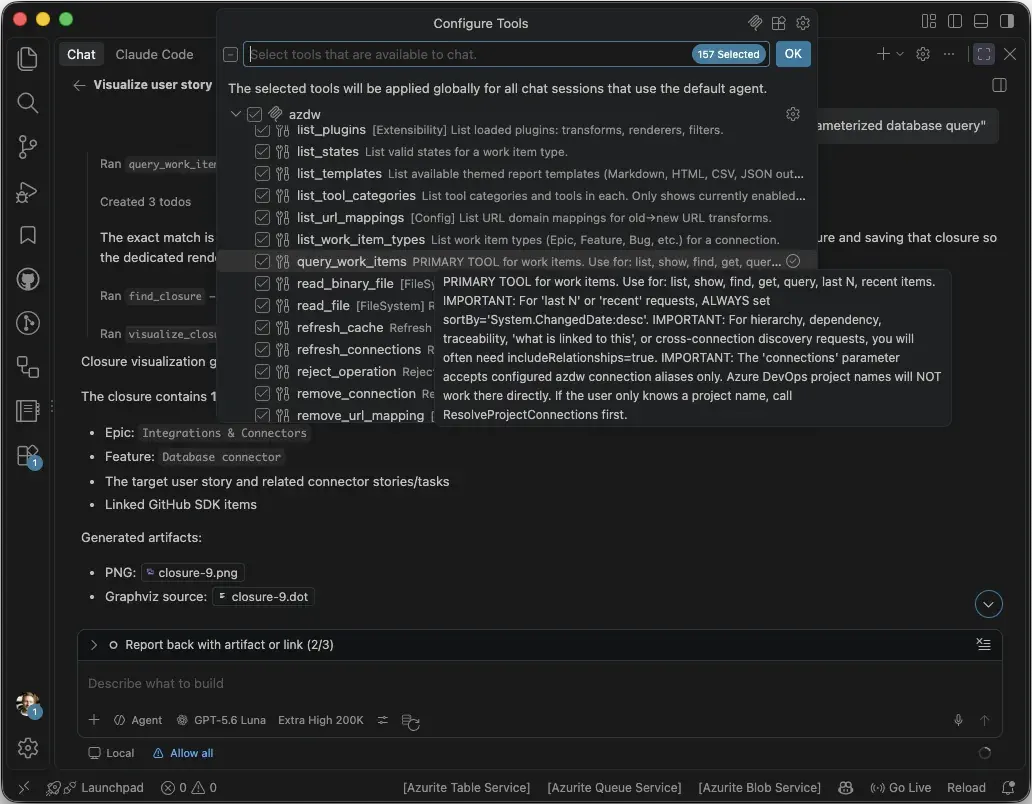
VS Code MCP configuration showing azdw registered as an MCP server alongside other servers

azdw MCP registered side-by-side in VS Code. They handle single-org depth; azdw adds the cross-tenant portfolio layer.

Vertical spotlight · healthcare / medtech

Three orgs. Two tenants. One traceability matrix.

Hypothetical scenario — illustrative figures

“Company X” develops medical imaging software under IEC 62304. Platform and CT modality work live in two Azure DevOps orgs in Tenant A; Central IT runs in a third org in Tenant B for historic, security, and regulatory reasons — plus GitHub Enterprise Server for open-source-derived components.

Before: three per-org exports merged by hand every quarter, a Power BI attempt that could not see the second tenant, and one regulatory-tagged item found by an auditor instead of the team.

  • ~30% less oversight effort — quarterly consolidation went from ~2 analyst-days to one re-run command.
  • Zero compliance tasks dropped from traceability matrices once cross-tenant closure resolution became the standard input.
  • Redundant initiatives eliminated — overlapping features visible in one table before staffing.
  • Portfolio data stayed inside the company — every model and agent endpoint in this scenario was local.
Two Entra ID tenants with three Azure DevOps organizations and a GitHub Enterprise Server, bridged by azdw Entra ID · Tenant A Tenant B GHES ADO · PlatformADO · CTADO · Central ITIssues stops here azdw · one queryable model across all of it relationships and hyperlinks resolved across the tenant boundary — in both directions boundaries still exist · azdw spans them
Monday morning, eight clients

Connect every client once. Switch with one flag.

Sign out, sign in, wrong browser profile, which org was it again, why are their fields named differently. azdw fixes the boring part: connect each client's org once — different tenants, GitHub too — and query one or all of them.

  • One script works everywhere — Agile, Scrum, and CMMI field names are abstracted.
  • Client-ready reports in minutesazdw report generate to Markdown or HTML, re-run next month.
  • Less than one billable hour per month — Professional at €499/year, unlimited client orgs.
  • Terminal AI chat when you'd rather ask than type — on your own local model if you like.
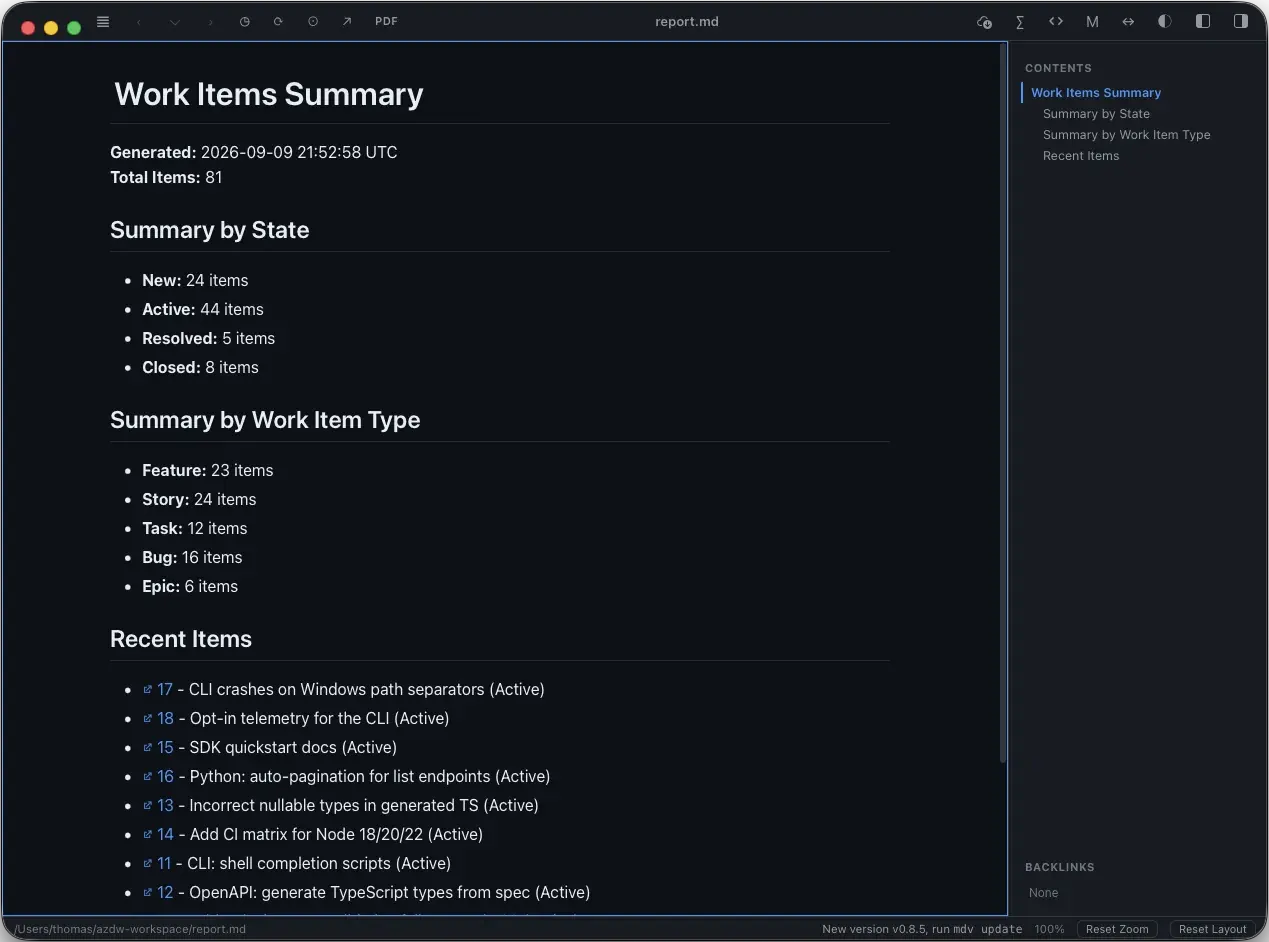
A generated azdw Markdown report rendered with headings and tables

A report generated from one command, ready to send.

If you already know…

Three ways to think about it.

“Claude Code, but for work-item & portfolio management instead of coding.”

Terminal-native, agentic, skills and MCP built in — pointed at your backlog instead of your repo. And useful with or without a model.

“The USB-C of work-item data.”

One self-describing CLI with guaranteed --json output. Plugs into shell, CI, PowerShell, MCP, REST/GraphQL, .NET — same shape regardless of org, tenant, or process template.

“Power BI cross-org reporting — but as a live, re-runnable query.”

No per-org datasets to stitch and refresh. One command, any format, cross-org relationships included — and Power BI can still consume the CSV if you want the dashboards.

Who it's for

Two very different desks. One tool.

Head of R&D Portfolio · PMO Lead · VP Engineering
  • Cross-tenant visibility with a dependency and traceability graph — no redundant initiatives, no audit surprises.
  • Keep work-item data inside the company by using only local model and agent endpoints, with two-phase approvals and re-runnable commands.
  • Numbers that can be re-derived on demand — the board-deck figure has a command behind it.
Talk about a pilot in local-only mode
Licensing

Less than €5 per employee per month for larger organizations.

Often under €1. Licensed per organization, not per seat — every employee can use it, whether ten people or ten thousand do.

ProfessionalUp to 5 employees
€499/ year

≈ €42 / month · unlimited client orgs · independent consultants and micro-consultancies

Buy via Paddle
Business6–50 employees
€1,999/ year

From €3.33 / employee / month at 50 employees

Buy via Paddle
Enterprise251+ employees
from €19,999/ year

€0.56 / employee / month at 3,000 employees · Managed / BYOC add-on available

Contact for a quote

Purchasing opens with the public release. Join the wait list and we'll tell you the day it does.

  • 30-day free evaluation, no license key ceremony
  • All components: library, CLI, MCP server, PowerShell module, Web UI, API service
  • All updates during the subscription year
  • Perpetual fallback license for the last version you received
  • Priority issue handling · invoicing and VAT via Paddle

“Organization size” is the total number of people employed or contracted by the licensing entity, regardless of how many use the software. Per-employee figures are the annual price divided by that headcount; Enterprise is quoted from €19,999 depending on scale.

Fully-local option — Ollama or any OpenAI-compatible endpoint
Two-phase write approvals: preflight → confirm
Re-runnable & auditable — every answer is a command
.NET 10 LTS · single binary, no runtime install
Linux · Windows · macOS (x64 + ARM64)
30-day free evaluation
Anonymous, opt-out telemetry — never work-item data
PAT · OAuth2 device code · browser sign-in · Key Vault
Coming soon

Be first to know when azdw ships.

One e-mail when the public release is out — where to get it and what it costs. No newsletter, no sharing, and your address is deleted right after that e-mail.

Questions we hear

Straight answers.

We already have the Microsoft Azure DevOps Remote MCP server.

Good — keep it. It gives your agents live single-org depth with official parity. It stops at the org/tenant boundary and does not know GitHub. Add azdw MCP alongside it in the same VS Code or Claude Code session; the moment a question spans two orgs or tenants, azdw answers it.

We already use the Git DevOps Assistant extension.

It's a strong in-editor developer workflow tool — sprint dashboards, PR drafting, pipeline triage — scoped to one org/project at a time. Portfolio questions, cross-tenant traceability graphs, governed reporting, and local AI are outside its scope. Both MCP servers run side-by-side.

Security won't allow AI on portfolio data.

azdw is useful without AI. If local AI is permitted, configure only local model and agent endpoints so work-item content stays in your infrastructure. Writes go through a two-phase preflight → confirm approval, and every answer can be traced back to a re-runnable data-collection command.

Who is responsible for AI output?

You choose and configure the AI provider, model, data, permissions, prompts, and instruction or skill files. Their terms apply, and their output can be inaccurate, incomplete or biased. You must review the output and every proposed change before relying on or approving it. azdw is not intended to make employment or other legally significant decisions about people. See the AI terms and permitted-use conditions.

We have Power BI.

Keep it for dashboards. The cross-org path is a manual, per-org Analytics/OData build that Microsoft documents themselves: weeks to stand up, maintained separately, no cross-org relationships, not re-runnable from a shell or an agent. azdw is minutes, live, re-runnable — and can feed Power BI via --format csv.

Does it really work with GitHub?

Yes — github.com and GitHub Enterprise Server. Issues are first-class work items with the same query, relationship, CRUD, visualization, and reporting commands. Labels, types, and states are projected into the unified model; Azure DevOps-only capabilities degrade gracefully.

Isn't letting an LLM loose on Azure DevOps expensive and unpredictable?

It is — if the LLM does the fetching. azdw collects deterministically for zero tokens and hands the model one pre-shaped payload. Tokens are spent on reasoning only, and the same input yields the same collection every run.

We're not healthcare — is this too niche?

Healthcare is where we started because it has the strictest version of the problem: regulated separation, multiple tenants, traceability duties. The root causes — M&A, scale limits, compliance separation, history — are industry-agnostic. If you have more than one Azure DevOps org, you have the problem; with two tenants, you have it badly.

I can script this myself with the REST API.

You can — for one org, one process template, one weekend. Then the second org uses Scrum instead of Agile, the third is in another tenant and auth breaks, the fourth is GitHub. azdw already abstracts process templates, resolves cross-tenant auth, handles partial success and rate limits, and keeps improving. One engineer-month of homegrown pipeline costs more than a year of azdw.
(say: “A-Z-D-U”) — wait, why?

Because the name is a ladder, and we just added a rung:

az
the Azure CLI
azd
the Azure Developer CLI
azdw
the Azure DevOps Work-item CLI — see the pattern.

Four letters, and the last one is a “double-u” — three syllables for a single letter, which is a lot to ask of anyone before coffee. So we say A-Z-D-U: the “D-U” does the job of D and W together. Not important. But now you know.

Mnemonic for the rock fans: think AC/DC, say AZ/DU. Same energy, fewer amps, no work item left behind. 🤘

Every org. Every tenant. One query.

Thirty-day evaluation, binary install, first cross-org query in minutes. If you have more than one org or more than one tenant, you already have the problem — see it in your own data.